


How to Know When You Need Professional Mac Repair in Dubai
Mac computers are widely used by professionals, students, business owners, and creative workers in Dubai. From managing business documents and attending online meetings to editing videos and designing graphics, a Mac can support many everyday tasks. However, like any electronic device, it can develop technical problems over time.
Some issues are minor and can be resolved through basic troubleshooting. Others may indicate hardware damage, battery wear, software errors, or internal component failure that requires professional attention.
Knowing when to seek professional Mac repair Dubai can help you avoid unnecessary downtime, protect important files, and keep your device working properly. This guide explains the common warning signs, what they may mean, and how to choose a suitable repair service.
Why Professional Mac Repair Matters
Mac computers are designed to provide reliable performance, but their components can experience wear through regular use. Dust, heat, accidental drops, liquid exposure, software conflicts, and ageing batteries may affect how a device operates.
For people working in areas such as Business Bay, Dubai Marina, and the Dubai International Financial Centre, a faulty Mac can interrupt meetings, delay projects, and affect daily productivity.
Professional technicians use appropriate diagnostic tools to investigate problems and identify their likely causes. Instead of replacing components without a clear reason, a suitable repair service should explain the fault and recommend a practical solution.
Early attention is especially useful when a problem becomes more frequent or affects essential functions.
1. Your Mac Is Running Slower Than Usual
One of the first signs that your Mac may need attention is a noticeable drop in performance. Applications may take longer to open, the system may freeze, or switching between tasks may become difficult.
Slow performance does not always mean that your Mac has a hardware fault. Possible causes include limited storage space, applications running in the background, outdated software, insufficient memory for your workload, or an ageing storage drive.
Start by restarting your Mac and checking the available storage space. You can also review Activity Monitor to identify applications using excessive memory or processing power.
If the problem continues, a professional technician can investigate further. The inspection may include checking system performance, storage health, software conflicts, and hardware condition.
For Dubai professionals who use demanding applications for design, accounting, development, or video editing, resolving performance problems can help restore a smoother working experience.
2. Your MacBook Battery Drains Quickly
Battery performance gradually changes as a MacBook gets older. You may notice that the battery drains faster than before, the laptop shuts down unexpectedly, or the device needs to remain connected to its charger for most of the day.
These symptoms may indicate battery wear, although background applications, high screen brightness, and demanding workloads can also affect battery life.
Check the battery condition through your Mac's system settings, where supported, and review whether particular applications are consuming excessive power.
If the battery condition is poor or the MacBook experiences unexpected shutdowns, arrange a professional inspection. A technician can determine whether the battery needs replacement or another component is responsible.
Pay attention to physical changes as well. If the trackpad becomes difficult to press, the case appears to be lifting, or the battery seems swollen, stop using the device and seek professional assistance promptly. Do not press, puncture, or attempt to remove a swollen battery yourself.
In Dubai's hot climate, avoid leaving your MacBook inside a parked car or exposing it to excessive heat, as high temperatures can affect battery performance.
3. Your Mac Frequently Overheats
Mac computers can become warm during demanding activities, including video editing, gaming, and running multiple applications. However, repeated excessive heat, unexpected shutdowns, or unusually loud fan activity may indicate a problem.
Possible causes include blocked ventilation, heavy background processes, dust accumulation, or a cooling system fault.
Make sure your Mac has enough space around its ventilation openings and avoid using it on soft surfaces that restrict airflow. Check whether an application is using unusually high processing resources.
If the device continues overheating during ordinary tasks, professional Mac repair may be necessary. A technician can inspect the cooling system, check the fans, and investigate software or hardware issues.
Ignoring persistent overheating may affect performance and place additional stress on internal components.
For people using their Macs for long working sessions in Dubai, keeping the device on a suitable surface and maintaining adequate ventilation can help reduce heat-related problems.
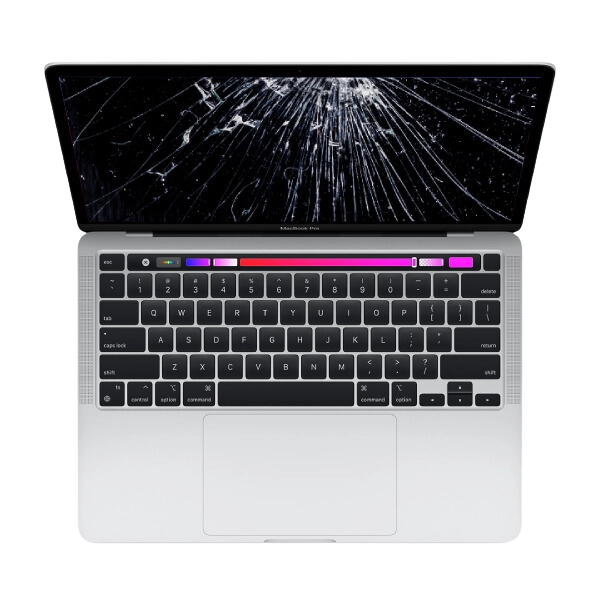
4. Your Mac Screen Has Cracks or Display Problems
A damaged display can make a Mac difficult or impossible to use. Common symptoms include cracked glass, flickering, coloured lines, black spots, uneven brightness, or a screen that remains black when the computer appears to be running.
Physical damage may occur after an accidental drop, pressure on the lid, or an object being trapped between the keyboard and display.
Not every display problem requires screen replacement. Software errors, display settings, graphics issues, or internal connections may also cause unusual screen behaviour.
If the display problem persists, a technician can examine the Mac and determine whether the screen assembly or another component needs attention.
Avoid pressing damaged areas or repeatedly opening and closing a laptop with a cracked display. Further pressure can worsen the damage.
If your MacBook is still accessible, back up important files before arranging the repair. This is a useful precaution before any hardware service.
5. Your Mac Will Not Turn On
A Mac that does not start can be particularly concerning, especially if it contains important business files or personal documents.
Possible causes include a depleted battery, faulty charging equipment, a damaged power connection, internal hardware failure, or a software-related startup problem.
First, check that the power adapter and cable are suitable for your device and that the power source is working. If possible, test with compatible charging equipment.
You can also follow Apple's recommended startup troubleshooting steps for your specific Mac model.
If the device still does not respond, avoid repeatedly attempting random fixes. A professional technician can investigate the power system, battery, internal components, and startup behaviour.
If your Mac contains valuable data, tell the repair provider before authorising any procedure that might erase the storage drive. Data recovery options depend on the nature of the fault and the condition of the device.
6. Your Mac Has Charging or Port Problems
Charging difficulties are another reason to seek Mac repair in Dubai. Your MacBook may charge intermittently, fail to recognise its adapter, or stop charging when the cable moves.
The issue may involve the charger, cable, charging port, battery, or internal power circuitry.
Start by checking the adapter and cable for visible damage. Make sure the connection is secure and use compatible charging equipment.
If the problem continues, a technician can inspect the charging port and related components. Avoid forcing a connector into the port or using sharp objects to remove debris, as this may cause further damage.
For desktop Macs, power-related problems may require a different diagnostic process based on the model and its power supply.
Prompt inspection can help identify whether a relatively simple connection issue or a more complex hardware fault is responsible.
7. Your Mac Keeps Freezing or Restarting
Frequent freezing, application crashes, and unexpected restarts can interfere with work and cause frustration.
These problems may result from incompatible applications, insufficient system resources, corrupted software, overheating, or hardware faults.
If the issue started after installing an application or updating macOS, make a note of the timing. This information can help a technician identify possible causes.
Check whether the Mac has sufficient free storage and install compatible software updates when appropriate. If a single application is responsible, updating or reinstalling it may help.
However, repeated system-wide crashes or unexpected restarts should not be ignored. A professional can run diagnostic checks and investigate whether the issue involves memory, storage, power, or another component.
For businesses in Dubai that depend on Macs for daily operations, resolving recurring crashes can help prevent interruptions and reduce the risk of losing unsaved work.
8. Liquid Damage or Unusual Noises Need Attention
Liquid exposure can damage a Mac even when the device appears to work immediately afterwards. Coffee, water, and other liquids may affect the keyboard, battery, logic board, or internal connections.
If liquid enters your Mac, disconnect the power source if safe to do so and stop using the device. Do not charge it, apply direct heat, or rely on rice to remove moisture. Arrange professional assessment as soon as possible.
Unusual sounds also deserve attention. While fan noise can increase during demanding tasks, clicking, grinding, or other unfamiliar sounds may indicate a mechanical or cooling problem, depending on the model.
If you suspect storage failure or hear unusual noises from a device with a mechanical hard drive, avoid unnecessary restarts because they may make data recovery more difficult.
Early professional assessment can help establish the extent of the damage and identify suitable repair options.
9. How to Choose a Reliable Mac Repair Service in Dubai
Once you recognise that your Mac needs professional attention, selecting the right service is the next step.
Look for a provider with experience handling your particular Mac model. MacBook Air, MacBook Pro, iMac, Mac mini, and Mac Studio devices have different designs and repair requirements.
Before approving any work, ask for a diagnosis and a clear estimate covering parts and labour. Confirm the expected repair time, replacement part options, and any warranty that applies to the service.
It is also important to ask about data protection. Back up your files if possible, and explain whether the device contains information that must be preserved.
Read customer reviews to understand how the provider communicates, handles repairs, and responds to problems after service.
techfix.ae is a Dubai based technology repair service that customers may consider for relevant Mac repair needs. Before booking, contact the provider directly to confirm that your specific Mac model and repair requirement are supported. Ask about diagnostic procedures, estimated costs, available parts, and warranty conditions.
Comparing these details can help you make a more informed decision without focusing only on price.
10. How to Prevent Future Mac Problems
Regular care can reduce the risk of some common Mac problems and help maintain reliable performance.
Keep macOS and your applications updated when compatible updates are available. Maintain enough free storage, remove applications you no longer need, and back up important files regularly.
Keep your Mac away from liquids, excessive heat, and unnecessary impacts. Use a suitable laptop bag when travelling and avoid placing heavy objects on top of your MacBook.
Ensure that ventilation openings remain clear and use compatible charging accessories. If you notice unusual heat, rapid battery drain, display faults, or repeated crashes, investigate the problem before it becomes more disruptive.
For business users, regular backups and a plan for accessing essential files can reduce the impact of unexpected hardware failure.
Conclusion
Knowing How to Know When You Need Professional Mac Repair in Dubai can help you identify warning signs and respond before a technical problem becomes more serious.
Slow performance, battery problems, overheating, display damage, charging faults, unexpected shutdowns, and liquid exposure are all reasons to consider professional inspection.
Not every problem requires a major repair, so accurate diagnosis is important. A suitable repair provider should explain the issue, offer transparent pricing, and help you understand the available options.
For Mac users in Dubai, regular maintenance, careful handling, and reliable data backups can support long-term device performance. When a problem continues despite basic troubleshooting, professional Mac repair can help you determine the next step and get back to your work with greater confidence.

 English
 Arabic
 French
 Spanish
 Portuguese
 Deutsch
 Turkish
 Dutch
 Italiano
 Romaian
 Portuguese (Brazil)
 Greek
